Shadow AI Risk
Explore the risks of broad OAuth permissions in AI tools, highlighted by the Vercel breach, and learn essential steps to safeguard your accounts.
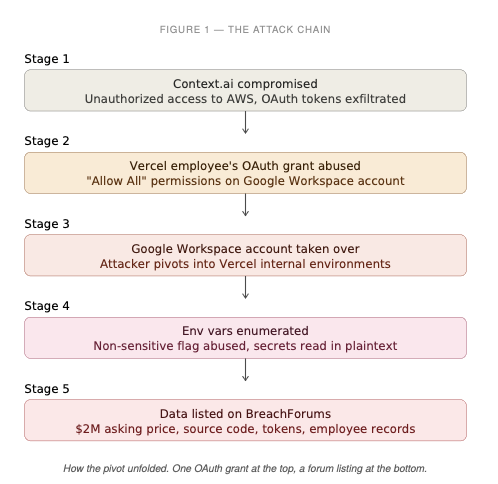
A Vercel employee clicked a button on an AI office suite called Context.ai and granted it "Allow All" permissions against their Google Workspace account. Weeks later, attackers who had compromised Context.ai used that OAuth grant to walk into Vercel's Google Workspace, pivot into the employee's Vercel account, enumerate environment variables that weren't flagged "sensitive," and list the loot for sale on BreachForums for $2M.
That is the whole breach. One consent screen. One checkbox. One AI tool nobody on the security team ever reviewed.
Guillermo Rauch, Vercel's CEO, put it plainly:
That last sentence is the one you should read twice.
What an OAuth scope actually is
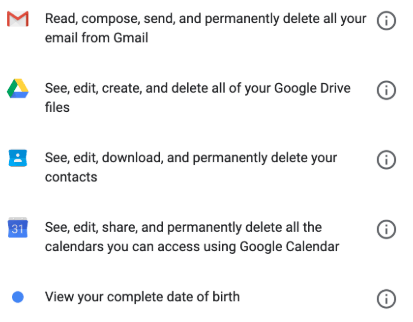
When you sign into "Cool AI Notetaker" with your Google account and it asks for "read your calendar, create events, read your email, send email as you, read your Drive files," every one of those is a scope. A scope is a token the third party gets to hold and reuse. Not a session. Not a login. A bearer credential that says: on behalf of this user, I am allowed to do X against this API.
A few things that are non-obvious and important:
-
You typed no password into the third party. OAuth was supposed to be safer than giving out passwords, and it is. But the tradeoff is that once you consent, the third party keeps a token that is often valid for weeks, months, or until you manually revoke it. If that third party gets breached, their database of tokens is a database of keys to your stuff.
-
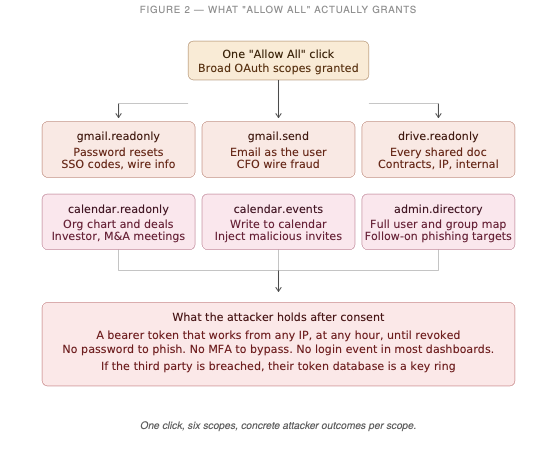
Scopes compound. gmail.readonly by itself is already a full inbox siphon. Add calendar and you get meeting invites, attendees, locations, recurring patterns. Add drive.readonly and you get every shared doc. The attacker does not need root on your machine. They already have a better vantage point than most of your coworkers.
-
There is no "only during business hours." Tokens work at 3am from any IP. There is no user to phish when the attacker already has the token.
"Allow All" and why it exists
Most well-built apps ask for narrow scopes: "I need calendar read, that's it." But a surprising number of AI tools, productivity suites, and meeting bots ask for the kitchen sink, either because they legitimately do many things or because the developer didn't want to implement the consent UX twice.
In Google Workspace language, granting "Allow All" on an internal OAuth config means the app can request any scope it wants against your account. In the Context.ai case, the Vercel employee signed up for their AI Office Suite using a Vercel enterprise account and clicked through. Context.ai's own post-incident statement says Vercel's internal OAuth configurations allowed this to translate into broad permissions inside Vercel's enterprise Workspace.
This is not unique to Context.ai. Look at the consent screen the next time any "AI assistant for Gmail" or "AI notetaker for Zoom" asks you to connect. The scopes are usually a wall of text. Most people click Allow. Most admins never see it happen.
Meeting AI and the new ambient risk
The category most people now carry this risk with is AI meeting assistants. Otter, Fireflies, Fathom, Read, Gong-style recorders, various Notion and Linear integrations, Granola style local tools that still sync back to cloud. You install one, it asks to read your calendar, create events (so it can autojoin), read your Drive (so it can attach transcripts), and sometimes read or send email (so it can share notes).
Each of those is a legitimate feature for a legitimate tool. Each is also a perfect pivot for an attacker who breaches that vendor:
-
Calendar read gives them your org chart, your deal pipeline (look at recurring titles), your travel, and your unannounced meetings with acquirers, investors, or regulators.
-
Calendar write lets them inject a meeting into a VP's calendar with a malicious Zoom link. That link now has internal legitimacy. Nobody questions a calendar invite that came from their own account.
-
Gmail read dumps the inbox. Password resets, SSO backup codes, DocuSign links, vendor wire instructions.
-
Gmail send is the apex. The attacker writes an email, as you, to your CFO, from your real account, in your thread history, matching your writing style (because LLMs are good at this now), with a wire change request.
Drive read exfiltrates the whole shared folder including the stuff marked "internal only" because the app has user-level access, not a permission-aware service account.
And all of this sits behind one button labeled Allow.
Why this is old, and why AI made it worse
The core problem, too-broad OAuth scopes on third-party SaaS, is ten years old. The 2022 Heroku and Travis CI incident used the same shape: attackers stole OAuth user tokens issued to those two integrators and used them to pivot into dozens of customer GitHub orgs, including npm.
The 2023 CircleCI incident was a close cousin: an infostealer on a CircleCI engineer's laptop stole a 2FA-backed session cookie, and the attacker ended up with customer environment variables, tokens, and keys, forcing CircleCI to rotate every customer GitHub OAuth token on the platform. Different initial vector, same systemic lesson: when a vendor holds your tokens, their breach is your breach.
Security teams have been writing "quarterly OAuth app review" into policies since before the iPhone X. What changed in the last 18 months is three things at once:
1. The number of third-party apps any given employee connects to their work identity has grown sharply because of AI. Every team now carries some mix of notetaker, writer, coder, researcher, meeting summarizer, voice cloner, and calendar optimizer. Each is a separate OAuth grant against the same identity.
2. The bar for "should I connect this" dropped because AI tools arrive faster than procurement can process them and employees feel productive pressure to adopt them yesterday. Security review is skipped because the tool "just reads my calendar."
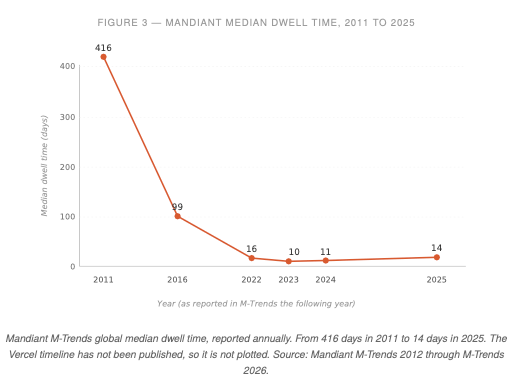
3. Once an attacker has a valid OAuth token and an LLM, the time needed to understand a target environment drops. Reading thousands of documents, mapping relationships between accounts and services, identifying which env vars smell like secrets, and drafting convincing follow-on phishing are now cheap operations. The Vercel bulletin describes the attacker as having "operational velocity and detailed understanding" of internal systems. That phrasing is doing real work. The median dwell time trend below shows that defenders have gotten faster at detection, but the reverse is also true on offense. The gap between "token stolen" and "loot staged for sale" is collapsing on both sides of the line.
The Vercel case illustrates the same mechanism. Context.ai was compromised. The attacker reached Vercel's Google Workspace through that compromise, reached Vercel internal environments from there, and read environment variables that had not been flagged "sensitive."
Vercel engaged Mandiant, notified law enforcement, and contacted impacted customers directly. The bulletin characterizes the attacker as having "operational velocity and detailed understanding of Vercel's systems."
What to actually do
For individuals and employees:
1. Go to myaccount.google.com/permissions right now. Look at every third-party app with access to your work Google account. Revoke anything you don't actively use this week. If you don't recognize it, revoke it. You can always reconnect.
2. When any AI tool asks for scopes, read them. If a notetaker is asking for gmail.send , ask why. There is almost always a reason, and the reason is almost always "we wanted to save engineering time on the share-notes feature."
3. Treat OAuth consent the way you treat admin sudo. Not a click. A decision.
For security and IT teams:
Pull your Google Workspace OAuth app report. Admin console, Security, API controls, App access control. Microsoft 365 equivalent is Entra ID, Enterprise applications. Inventory what is connected, who connected it, which scopes, when. Quarterly at minimum. Some orgs need monthly.
Stop user-driven OAuth approval for apps requesting sensitive scopes. Move to an allowlist model. Yes, this is painful. It is less painful than the Vercel playbook.
Specifically check for the Context.ai IOC Vercel published: OAuth client ID 110671459871-30f1spbu0hptbs60cb4vsmv79i7bbvqj.apps.googleusercontent.com . If it appears in your tenant, assume compromise and go to incident response.
Separate "non-sensitive" from "non-secret." Vercel's env var UI let people mark things as non-sensitive that were actually API keys and tokens. Nobody does this on purpose. They do it because the default ergonomics made it easy. Audit the assumption that anything stored in a key-value system not flagged "secret" is actually safe to expose to an enumeration.
Assume any third-party AI SaaS will eventually be breached. Budget for the day it happens. Tokens should rotate. Scopes should be narrow. Access should be logged in a place the vendor cannot edit.
A free tool to audit your own exposure
Everything above is advice. Advice without a tool is just pressure. So we built one.
OAuth Exposure Scanner - a free Claude Skill A read-only audit of every third-party app connected to your Google account. It runs entirely inside your own browser, using Claude in Chrome, against the page you would visit yourself at myaccount.google.com/permissions . No copy-paste. No new login. No OAuth grant. No API call to Google.
Nothing leaves your machine except the conversation you are already having with Claude. The skill classifies every authorized app as Critical, High, Medium, or Low based on the actual OAuth scopes it holds, flags stale grants older than six months, and checks every visible OAuth client ID against a list of known-compromised apps, including the Context.ai client ID published in Vercel's bulletin. It does not click "Remove Access" for you. Revocation stays a manual, deliberate decision you make after reviewing the report.
Requirements: Claude in Chrome installed and active. A Google account you are signed into.
Download: https://github.com/KonaSense/oauth-exposure-scanner
How to use:
-
Download oauth-exposure-scanner.skill from the GitHub page.
-
In Claude, go to Settings → Capabilities → Skills → Install custom skill, and select the downloaded file.
-
Open a new conversation with Claude in Chrome active, and ask: "Audit my Google OAuth permissions."
-
The skill will ask for permission to open myaccount.google.com/permissions in your browser. Say yes. Review the report. Revoke the apps you decide should go.
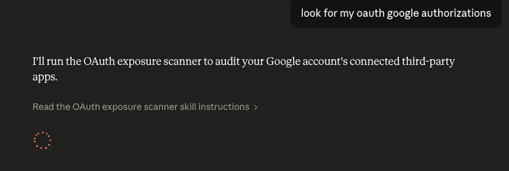
Open source, MIT license. Pull requests welcome, especially for new IOCs when the next vendor gets compromised.
The headline
The oldest rule in security still holds. You cannot delegate trust to a vendor who has less invested in security than you do. The AI wave is handing that delegation out at a scale nobody has seen before, inside a consent model that was built for a simpler web and a slower attacker.